GMAT® Table Analysis: A Complete Guide
Table Analysis is the Data Insights question type that looks the most like work you already do. You get a table of rows and columns, a dropdown menu that sorts it, and three statements to judge against the data. After the tabbed documents of Multi-Source Reasoning and the two-column grids of Two-Part Analysis, it can feel like the format where someone finally handed you a tool you've used for years.
The familiarity is a fair starting point, and it covers less than it seems to. The table carries far more data than the statements need, every statement has to be right for the question to score, and the sorting menu is the only tool you get. Used deliberately, that one tool is usually enough. This guide covers the format, the sort-first method, and the decisions the scoring rules should shape.
What Table Analysis looks like
Table Analysis is one of the four integrated reasoning formats inside the Data Insights section, alongside Multi-Source Reasoning, Graphics Interpretation, and Two-Part Analysis, with Data Sufficiency rounding out the section. The screen has three pieces. A short paragraph introduces the data and defines anything the column headers leave unclear. The table holds the rows and columns, with a dropdown menu above it for sorting. Then the question presents three statements, each with a two-option answer.
The option pairs vary. Some questions use Yes and No, others True and False, others a pair like Inferable and Not inferable. Whatever the labels, the structure doesn't move: three judgments about the same data view, and all three have to match the table for the question to count.
The sort control is what makes this format what it is. You can rearrange the rows by any column, ascending or descending, one column at a time. That's the full extent of the interactivity. There's no filtering, no formulas, and no way to add a column of your own, so the questions are built to be solved with what sorting plus careful reading can reach.
One counting note for anyone practicing from older materials: Table Analysis questions from the GMAT® Classic era often show four statements instead of three. The extra statement changes the workload, not the approach.
Sort by what the statement is about
The method fits in one line: put the column the statement is about in charge of the table, then read.
A statement asks whether at least five employees logged more than 40 hours. Sort by the hours column and count the rows above the line. A statement asks whether the supplier with the lowest unit price is also the fastest to deliver. Sort by price, look at the top row, and check the delivery column against the rest. Each statement names an aspect of the data, and that aspect is almost always a column header, or a value you can find by comparing what's in one.
The habit worth building is running this the same way every time: read the statement, name its column, sort, then answer. The difficulty in these questions usually lives in the volume of rows, not in the logic, so the same robotic rhythm on every question beats hunting for a fresh approach on each one. Careful reading matters too, and the statements turn on small words. "More than four" and "at least four" are different claims, and "exactly two" rules out three. If a statement still hasn't landed by a third read, our guide to Multi-Source Reasoning covers the skip-and-return rule this section shares.
When the sort can't reach: computed statements
The statements split into two groups by the work they ask for.
The first group is lookup work. The value being asked about already lives in a column, and the sort turns the question into counting or comparing. Most statements fall in this group, which is a big part of why the sort-first habit carries these questions.
The second group asks about a quantity that isn't a column. Profit per order is the standard example: the table gives you total profit and a count of orders, but no per-order figure, and there's no way to add a calculated column the way spreadsheet software would. The move here is to let the sort narrow the field first, then run the arithmetic on the rows that remain. If a statement asks about the customer with the most orders, sorting by orders checks the top of the table before any division happens, and a question built around a derived value often needs arithmetic on only a few rows. The computation itself tends to stay light; the reasoning lives in deciding which rows deserve it.
No partial credit, and what it changes
All three statements have to be right. Two right and one wrong scores as a wrong question, the same all-or-nothing rule that runs through Multi-Source Reasoning and Two-Part Analysis.
The rule sounds strict, and it has a practical upside. When you're low on time and unsure about a question, an unsure Table Analysis set is usually a better candidate to leave and revisit than an unsure single-answer one, because a guess has to land all three statements to score. The review feature lets you change answers on up to three questions per section, so an early bookmark isn't a final decision. Our guides to guessing on Data Insights and when to let go of a question cover the broader judgment.
Timing and the calculator
The Data Insights section runs 20 questions in 45 minutes, which works out to about two minutes and 15 seconds per question. Table Analysis questions tend to sit at both ends of that budget. When the sort does its job, three lookup statements on a sorted table can finish well under the average. Left unsorted, the same question turns into a long scan down the rows by eye, which is among the slowest ways to spend two minutes on this exam. If you catch yourself reading the table row by row, that's usually the signal to stop and use the dropdown instead. Our guide to timing strategy covers pacing for the whole section.
The on-screen calculator is available throughout the Data Insights section, Table Analysis included. It can speed up arithmetic, but most of the work on these questions is sorting and reading, and the computation is usually light enough to skip the tool. Our guide to the calculator rules covers what it can and can't do.
How to study for Table Analysis
Three things, in order.
Quant and verbal first. These questions reuse the content from those sections, so the prep you're already doing is the prep they draw on. There's no new math hiding in a Table Analysis table, and no new verbal technique either.
Then format practice at volume. The sort-first habit is a reflex, and reflexes come from repetitions. Older integrated reasoning material from the GMAT® Classic era should work fine for this, because the sorting interface and the statement structure carried into the Focus Edition close to unchanged, four-statement versions and all. Our guide to the Data Insights section has the full picture of what else shares the screen.
Then the audit. Fold the type into the question-type audit from our guide to breaking through a score plateau: "when I see a sortable table, I read the statements, sort by the column each one names, and compute only where the sort can't reach."
Try this one
Practice question — Table Analysis
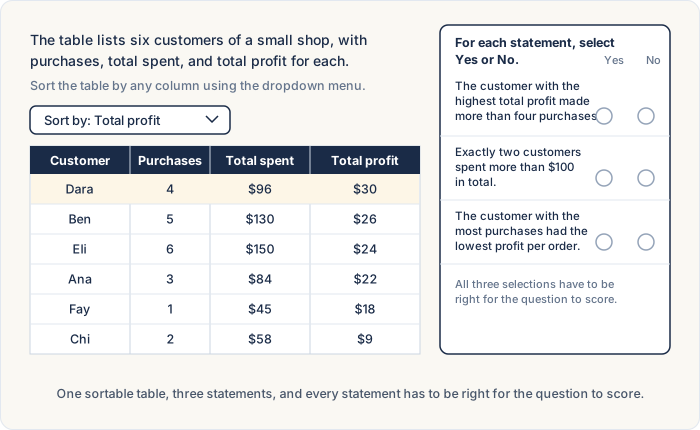
A small shop tracks six customers. For each statement, select Yes or No based on the data in the table. On the exam, a dropdown above the table sorts the rows by any column.
| Customer | Purchases | Total spent | Total profit |
|---|---|---|---|
| Ana | 3 | $84 | $22 |
| Ben | 5 | $130 | $26 |
| Chi | 2 | $58 | $9 |
| Dara | 4 | $96 | $30 |
| Eli | 6 | $150 | $24 |
| Fay | 1 | $45 | $18 |
For each statement, select Yes or No.
1. The customer with the highest total profit made more than four purchases. Yes No
2. Exactly two customers spent more than $100 in total. Yes No
3. The customer with the most purchases had the lowest profit per order. Yes No
Reveal answers
Statement 1: No. Sorting by total profit puts Dara's $30 at the top, and 4 purchases isn't more than four.
Statement 2: Yes. Sorted by total spent, the column runs $150, $130, $96, and down from there. Exactly two rows clear $100.
Statement 3: Yes. Eli's six purchases are the most, and his profit per order is $24 ÷ 6 = $4, the lowest of the six.
Try this one before reading on. Picture the dropdown, decide which column each statement sends you to, then keep going.
The first two statements are lookup work, and the sort handles them. For the first, sort by total profit: Dara's $30 tops the table, and 4 purchases isn't more than four, so the answer is No. For the second, sort by total spent: the column runs $150, $130, $96, and down from there, and exactly two rows clear $100, so the answer is Yes.
The third statement is half lookup, half computation. Sorting by purchases confirms Eli's six purchases lead the table, but profit per order isn't a column, so no sort can check it for you. The division is light across six rows: profit per order runs $7.33, $5.20, $4.50, $7.50, $4.00, and $18.00, and Eli's profit per order is \24 \div 6 = $4$, the lowest of the six. The answer is Yes.
Three statements, and the sort did the deciding on two of them while the third needed six quick divisions. That split, lookup first with computation only where the columns run out, is the shape of almost every Table Analysis question.
FAQ
What is Table Analysis on the GMAT®?
A Data Insights question type that presents a sortable spreadsheet-style table and asks you to judge three statements against it. Each statement gets one of two answers (Yes or No, True or False, etc.), and the content draws on the same quant and verbal material as the other sections.
How many statements does a Table Analysis question have?
Usually three on the GMAT® Focus Edition. Questions from the Classic era often show four. Either way, every statement has to be answered correctly for the question to score.
Can you sort the table in Table Analysis?
Yes. A dropdown menu sorts the rows by any column, ascending or descending, one column at a time. There's no filtering and no way to add calculated columns, so sorting is the one tool the format gives you.
Do you get partial credit on Table Analysis?
No. One wrong statement scores the whole question as wrong. It's the same all-or-nothing rule the section's other multi-part formats follow.
Can you use the calculator on Table Analysis?
Yes. The on-screen calculator is available throughout the Data Insights section. Most Table Analysis work is sorting and reading, so the tool usually sits idle on these questions.
What's the difference between Table Analysis and Multi-Source Reasoning?
Table Analysis gives one sortable table; Multi-Source Reasoning gives two or three tabbed sources, only one visible at a time. A Table Analysis question is one batch of statements on a single data view, while Multi-Source Reasoning usually spreads two or three questions across the tab set. Both score all-or-nothing.
How do you solve Table Analysis questions?
Read the statements first, sort the table by the column each statement is about, and answer the lookup statements directly. For statements about quantities that aren't columns, let the sort find the candidate rows and compute only those.
Want to learn even more?
Related reading:
- GMAT® Data Insights: A Complete Guide
- GMAT® Multi-Source Reasoning: A Complete Guide
- GMAT® Two-Part Analysis: A Complete Guide
- How to Guess on GMAT® Data Insights: Elimination Tactics for Every DI Question Type
- GMAT® Timing Strategy: How to Pace Each Section
- When to Let Go of a GMAT® Question
Our podcast episode "GMAT® Focus Data Insights: The Complete Guide for 2024 and Beyond" walks through the whole Data Insights section, Table Analysis included, and "What Everyone Should Know About the Integrated Reasoning Section" covers where these questions come from. You can listen on Spotify, Apple Podcasts, or YouTube, where you'll find our full catalog of strategy episodes.